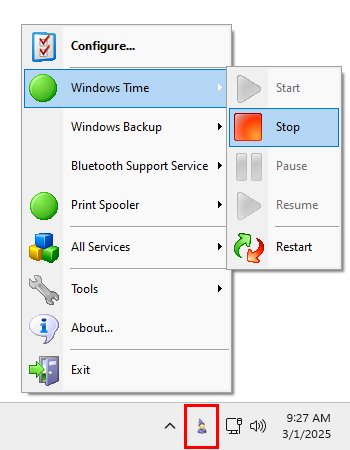
|
Easily manage your important Windows Services
from the Windows Taskbar |
Start and stop your critical Services with just a few clicks!
ServiceCommander is a free utility that helps you to take control of your important
Windows Services.
Easily start, stop, or restart selected services on any computer on your network, all conveniently from the Windows Taskbar.
Key Features & Benefits of managing your Windows Services with ServiceCommander
- Start / stop / restart your important services easily from the Windows Taskbar ("system tray")
- Quickly discover if your important services are running
- Assemble a set of services from any computers on your network - local or remote
- Manipulate all services as a group
- A friendly alternative to the Windows Service Control Manager (SCM)
- Avoid having to rely on the net.exe and sc.exe utilities at the command line
Using ServiceCommander
ServiceCommander resides in the Windows Taskbar — in the cluster of icons at the bottom right of the desktop (near the clock).
Its icon looks like a wizard:
When you click the icon, the taskbar menu appears.
The Taskbar Menu
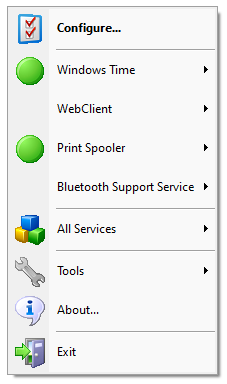
The menu lists the services you have selected and allows you to manipulate them.
Here's the menu when ServiceCommander is managing four services — Windows Time, WebClient, Print Spooler and Bluetooth Support Service:
The menu features the following entries:
Configure: Select the list of services to manage, setup a hotkey, etc.
<Service 1>: Start / stop / pause / resume / restart the first service in the list you have selected
<Service 2>, etc.: Start / stop / pause / resume / restart the second service in the list you have selected
All Services: Start / stop / pause / resume / restart all services being managed, simultaneously.
Tools: Open the
Event Viewer,
Services application,
Task Manager or
Computer Management
from the sub-menu.
About: Display information about ServiceCommander.
Exit: Close ServiceCommander.
Configuring ServiceCommander
Selecting the "Configure" menu entry will summon the Configuration window. It has two tabs — Services and Options.
Managing the list of Windows Services
The Services tab is where you choose the set of Windows Services you wish to manage.
Here we see ServiceCommander working with three services previously selected:
Several buttons direct the action:
Add: Brings up the "Add Services" window.
Remove: Removes the selected service(s).
Move up: Moves the selected services closer to the top of the list.
Move down: Moves the selected services closer to the bottom of the list.
Remove all: Removes all services from the list
Import: Loads configuration settings from a previously exported file (see Export).
After clicking the button, you will be prompted to select the file to be imported.
Export: Saves configuration settings to a file.
This file can be imported by ServiceCommander on another machine to re-create the settings there (see Import).
Adding local and/or remote services to the list
The Add Services Window allows you to choose a set of services from a computer, local or remote:
First, select or enter the computer name hosting your services. Select "Browse" from the Computer combo-box to see computers on your network.
Once the services have been loaded, check the ones of interest and click on the OK button.
You will be returned to the "Configure ServiceCommander" window with those services added to your list.
Changing ServiceCommander settings
The Options Tab hosts a few miscellaneous settings:
Start automatically when you log on: Check to have ServiceCommander automatically start whenever you log on to your computer.
Disable taskbar notifications: Check to prevent ServiceCommander from displaying taskbar status messages (success and failure).
Show small icons on the taskbar menu: By default, ServiceCommander displays 32x32 icons on the menu. Check this box if you prefer smaller, 16x16 icons
— perhaps to fit more services on-screen.
Show the menu when this key is typed: Select a key combination ("hotkey") that will launch the menu without having to
click on the taskbar icon.
When a hotkey is specified, typing that key will immediately summon the ServiceCommander menu. The menu will be anchored at the location of the mouse cursor.
Show these actions on each service's sub-menu: Select what service operations you would like to show.
Show Configure: Check to show the "Configure" entry on the taskbar menu.
Show All Services: Check to show the "All Services" entry on the taskbar menu, which will allow you to manipulate
all services as a group.
Show Tools: Check to show the "Tools" entry on the taskbar menu, which makes it easy to launch useful utilities
(such as the Task Manager).
Show About: Check to show the "About" entry on the taskbar menu, which shows program information.

 (888) 881-CORE