(888) 881-CORE






|
Version
9.5 6.8 MB Installer |
|
|

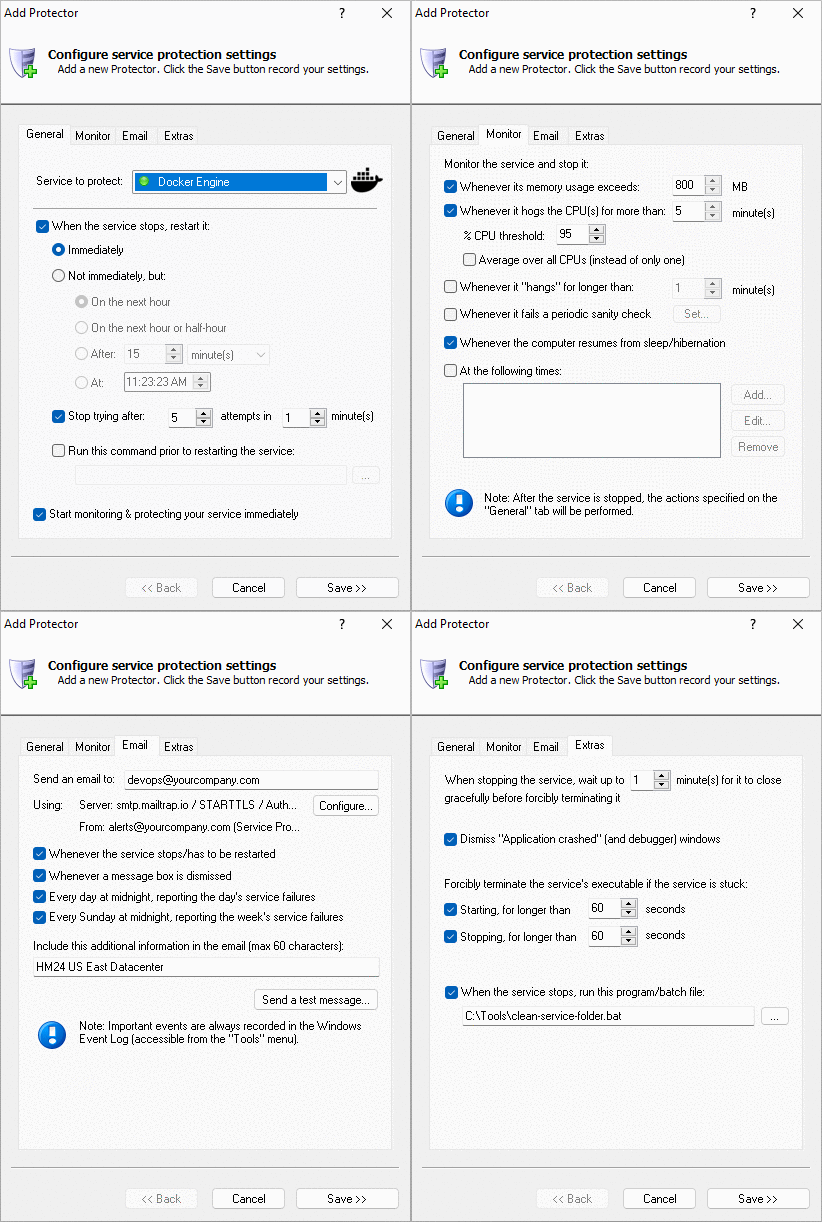
Service Protector automatically restarts your mission-critical Windows Services whenever they crash, hang, leak or fail. Run 24/7 today!

Service Protector will help your Windows Services achieve 100% uptime,
even when they crash, hang, leak memory, or hog the CPU.
You can even plug in your own custom failure-detection script/program to identify "zombie services", which seem to
be running but are not doing what they are supposed to do. Or automatically restart your Windows Service every night when no one is
logged on, to cure memory leaks and other imperfections.
 Key Features & Benefits of Running your Windows Service 24/7 with Service Protector
But perhaps most important of all, Service Protector was designed and implemented by Senior Software Engineers with over 25 years of real-world experience developing robust, mission-critical applications. Our software is of the highest quality, and we stand by it without reservation.
Why do I need Service Protector? Isn't the builtin Windows Service Recovery good enough?Windows 2000 introduced a basic service recovery mechanism to handle Services that stop prematurely. When a Windows Service stops abnormally (i.e. while not in the stopped state) it can be restarted, a program can be run, or the machine can be rebooted. While this minimal functionality will be adequate for many, professionals in mission-critical environments will appreciate the advanced features that Service Protector offers, including:
Purchase Service Protector
|
|||||||||||||||||||||||||||||||||||||||||||||||||||||||||||||||||||
 |
Not sure if you want to buy yet? Read how we address some of the top concerns, to help you make the best decision. |
 |
After you pay for the software, we will send you an email to thank you and to start the online registration process. Click here for full details. |

|
Payments are made through 2Checkout — our secure, third-party payment processor that accepts all major credit cards. 2Checkout uses bank level security, PCI Level 1 Data Security Standards, and industry leading technology to process your payment securely. |
After you purchase, we will send you an email to thank you and to start the online registration process. Please be sure to enter a valid email address when purchasing, and please check your Spam/Junk folders if you don't hear from us very soon!
| Item | Price (USD) | |
| 1 license | $99.99 |

|
| 2 licenses @ $89.99 each — a 10% discount | $179.98 |
|
| 3 licenses @ $89.99 each — a 10% discount | $269.97 |
|
| 4 licenses @ $89.99 each — a 10% discount | $359.96 |
|
| 5 licenses @ $89.99 each — a 10% discount | $449.95 |
|
| 10 licenses @ $79.99 each — a 20% discount | $799.90 |
|
| Limited Site License
Install on up to 50 computers, at a single geographic location (50% savings). Annual maintenance is $299 after the first year. |
$1,999.00 |
|
| Unlimited Site License
Install on an unlimited number of computers, at a single geographic location (unlimited savings). Annual maintenance is $499 after the first year. |
$2,999.00 |
|
| Limited Enterprise/ Install on up to 100 computers, at multiple geographic locations (62% savings). Annual maintenance is $499 after the first year. |
$2,999.00 |
|
| Unlimited Enterprise/ Install on an unlimited number of computers, at multiple geographic locations (unlimited savings). Annual maintenance is $799 after the first year. |
$3,999.00 |
|
| Limited OEM license
Royalty-free distribution, limited to a maximum of 25 client installations per year. Annual maintenance is $299 after the first year. |
$1,999.00 |
|
| Unlimited OEM license
Royalty-free distribution, with unlimited client installations per year (unlimited savings). Annual maintenance is $799 after the first year. |
$3,999.00 |
|
| Upgrade license @ $49.99 — a 50% discount | $49.99 |
|
 Buy with a Purchase Order (PO) |
|
|
|
||
Service Protector
Download & Try it Free!
Buy it Now!

|
$99.99 — volume discounts apply |
|
|
Our 12,000+ customers include...



|
Peace of mind for your important Windows Services! |
|
 |

|
Step-by-step guides for 60+ Services
- MySQL
- Print Spooler
- Apache
- PostgreSQL
- JBoss
- MongoDB
- Bamboo
- Tomcat
- QuickBooks
- MSMQ
- Abyss
- Mozy Pro/Home
- Google Cloud Print
- Bonjour
- IIS
- RabbitMQ
- SQL Server Agent
- Jenkins
- RealVNC
- Elasticsearch
- Hudson
- RavenDB
- TeamViewer
- WildFly
- FileZilla
- GlassFish
- Confluence
- Openfire
- Bitvise SSH
- Quartz.NET
- freeSSHd
- UniFi Wireless
- DeltaCopy
- IIS SMTP
- Amazon MTU
- Yawcam
- Virtuoso
- Mongoose
- Lotus Notes NSD
- Redis
- SonarQube
- Data Capture
- Mule
- Windows Firewall
- Filebeat
- Consul
- PacketCache
- Resilio Sync
- SmarterMail
- Zabbix Agent
- Atlassian Crowd
- Memurai
- Grafana
- RaiDrive
- OpenDJ
- GpsGate Splitter
- Eclipse Mosquitto
- PortSIP WebRTC Gateway
- EMQ X Broker
- VisualSVN Server
- Jungle Disk
- Tftpd64
- Telegraf
- Syncrify
- MariaDB
- Docker Engine
- Gitea
- Tailscale
and many more!