(888) 881-CORE
 I work for a large technology company based in Germany. Last year, we bought an Unlimited OEM License for AlwaysUp and integrated it into our industrial automation delivery chain.
As an important supplier, we want to ensure that your company takes a holistic approach to Cybersecurity. And in particular, we’d like to know if you’ll be implementing the new EU Cyber Resilience Act (CRA). Please provide a short statement.
If your product will comply, we can rely on that. If you cannot confirm conformity (mostly in case delivery is done outside the EU market), we may have to analyze further effects on our side and raise additional requests/requirements.
— Michael S.
Hi Michael, thanks for reaching out.
Even though we’re based in the USA, our team has been tracking this new EU regulation ever since it started taking shape in 2023. It soon became clear that the CRA would impact us since we have many customers deploying our software in the EU.
But let’s start at the beginning.

What is the Cyber Resilience Act (CRA)?
The EU Cyber Resilience Act enhances cybersecurity standards for hardware and software products by requiring manufacturers and retailers to infuse cybersecurity throughout the lifecycle of their products. It came into force in November 2024 and organizations in the European Union have until December 2027 to achieve full compliance.
Our company isn’t located in the EU and we don’t make any hardware products. But we do create software used by EU companies. As such, we must help our EU customers adhere to the CRA.
Fortunately the CRA aligns with other global standards — like ISO 27001:2022 — which we already embrace. So let’s review what we have in place today.
We’re serious about security
To understand we do today, please review this article detailing how we keep our software (and company) safe and secure. There, you’ll see that we’ve infused information security best practices throughout our processes and practices.
But even though there’s overlap with the CRA and other time-tested standards, the new regulation brings its own perspectives. It deserves dedicated examination. Therefore, from our viewpoint as a US-based software producer, we’ll review 10 major requirements of the CRA and briefly describe how we support you and other EU organizations in each area.
CRA Requirement #1: No exploitable vulnerabilities
Don’t ship software with serious flaws

 How we help you to comply
It’s very important to check for malware at every stage of the software production pipeline. And, most importantly, the final product must be pristine. That’s why we engage third-party services to verify that nothing strange has crept into our software.
For example, before release, we run all our applications through Virustotal — a well-respected online virus-scanning engine owned by Google. We halt the release if any critical or high vulnerabilities are detected.
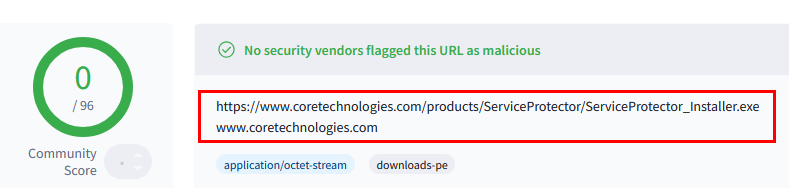
The bottom line: The software we provide to customers is free of major known vulnerabilities at the time it’s shipped.
CRA Requirement #2: A secure default configuration
Make software as secure as possible out-of-the-box
How we help you to comply
Both AlwaysUp and Service Protector:
Must be installed by an administrator
Are installed to a protected folder in “C:\Program Files (x86)” by default
Must be run by an administrator
There’s no way around those important, default safeguards.
Furthermore, there are no “default passwords” of any kind.
CRA Requirement #3: Regular security updates
Establish a method of resolving vulnerabilities discovered after the software was installed
How we help you to comply
It’s company policy to issue a patch for critical and high vulnerabilities within 30 days of their discovery. Medium and Low vulnerabilities are addressed as part of regularly scheduled quarterly or annual releases.
However, as purveyors of software that must operate 24/7/365, we do not support unattended, automatic updates because they’re too dangerous. We leave it to customers to deploy updates manually — after sufficient testing and at a time of their choosing. We keep customers informed of security issues by posting security bulletins on our active blog.
CRA Requirement #4: Protection from unauthorized access
Ensure that the software is accessible only to those who are allowed to use it
How we help you to comply
AlwaysUp and Service Protector are restricted to administrators only. A standard user without admin rights cannot start either of the programs on his own.
If a standard user attempts to start AlwaysUp, Windows prompts for admin credentials:
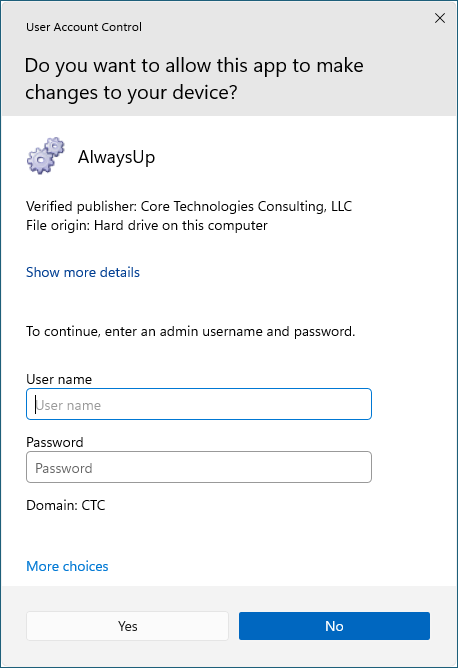
That important safeguard prevents untrusted (or untrained) individuals from updating your critical applications and services.
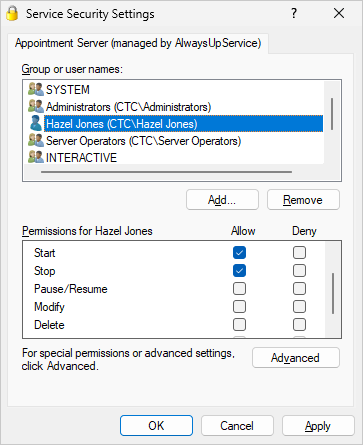
Furthermore, after you install your program as a service with AlwaysUp, you have the power to enforce who can start, stop, restart or edit the service.
That capability is available by selecting Advanced > Service Security Settings from the Application menu:
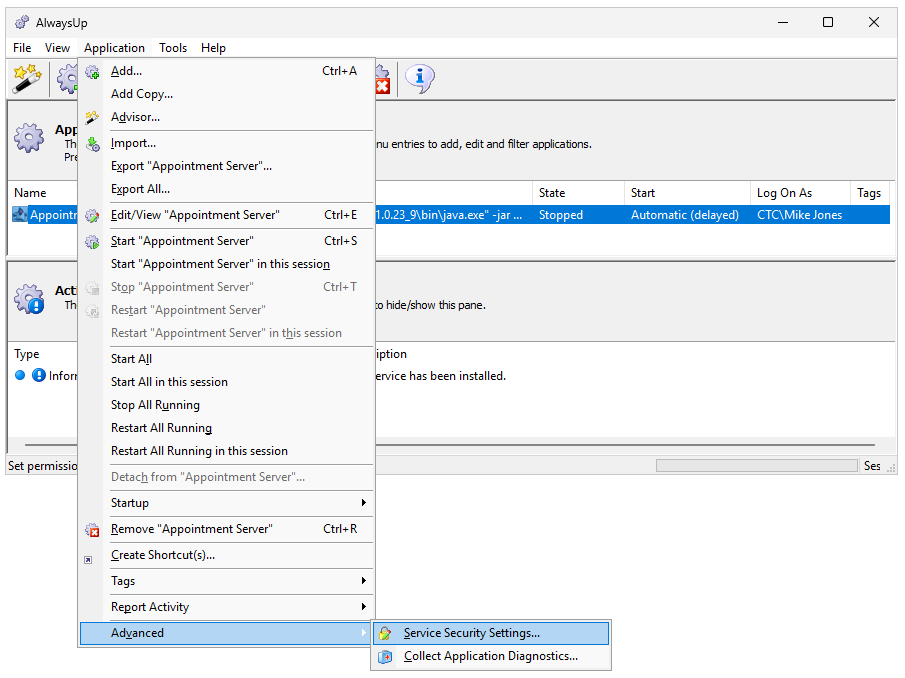
From there, it’s easy for you to specify what each user can do. For example, here’s how we allow Hazel Jones to start or stop the service, but not to modify or delete it:
CRA Requirement #5: Data confidentiality
Maintain the confidentiality of all data processed
How we help you to comply
None of our products collect personal data.
And when our applications communicate with our servers — for example when checking for updates or assigning a license — all data is encrypted in transit over HTTPS.
CRA Requirement #6: Data integrity
Protect data collected from manipulation or modification
How we help you to comply
By design, we intentionally limit the data stored by our applications. That’s because our strong preference is to delegate all data persistence to the Windows operating system.
For example, when you set up an application with AlwaysUp:
Your configuration/settings are saved in the standard registry entries related to the Windows Services created
Any account passwords you supply are saved and protected by Windows itself (the same way it handles other passwords)
That is, there is no separate repository of data managed by AlwaysUp. And we rely on Windows to protect any settings we collect from manipulation or modification.
CRA Requirement #7: Minimize data collection
Don’t collect and process data unless it’s absolutely necessary
How we help you to comply
As mentioned before, we intentionally limit the data collected and stored by our applications. And none of our products collect personal data.
That’s by design. We simply don’t want the responsibilities, requirements and headaches that come with collecting unnecessary information!
CRA Requirement #8: Protect essential functions
Employ methods to survive cyber attacks and other onslaughts
How we help you to comply
AlwaysUp and Service Protector are all about protecting essential functions. It’s not a stretch to say that simply using our products demonstrates your commitment to surviving crashes, human error, and other exceptions — just as the CRA demands.
Our software can also help you protect your systems from cyber attacks. For example, you can have AlwaysUp run your security monitoring components 24/7. And in that scenario, even if a hacker kills your application, AlwaysUp will be there to restart protection in a few seconds.
CRA Requirement #9: Limit attack surfaces
Minimize interfaces and other points of vulnerability when designing and implementing software
How we help you to comply
Security always has a front row seat whenever we design and build software.
For example, with AlwaysUp:
There are no open/listening TCP/IP ports
All communication is encrypted in transit
Program settings (including passwords) are stored by the operating system and accessed via Windows API functions
Only administrators can run the program
CRA Requirement #10: Logging & monitoring
Implement event logging and reporting
How we help you to comply
Both AlwaysUp and Service Protector write detailed, timestamped messages to the Windows Event Logs. If you’re curious, this page documents the information, errors and warnings reported by AlwaysUp.
Specifically, AlwaysUp writes entries to the Application event log. You can browse those records using the Event Viewer:
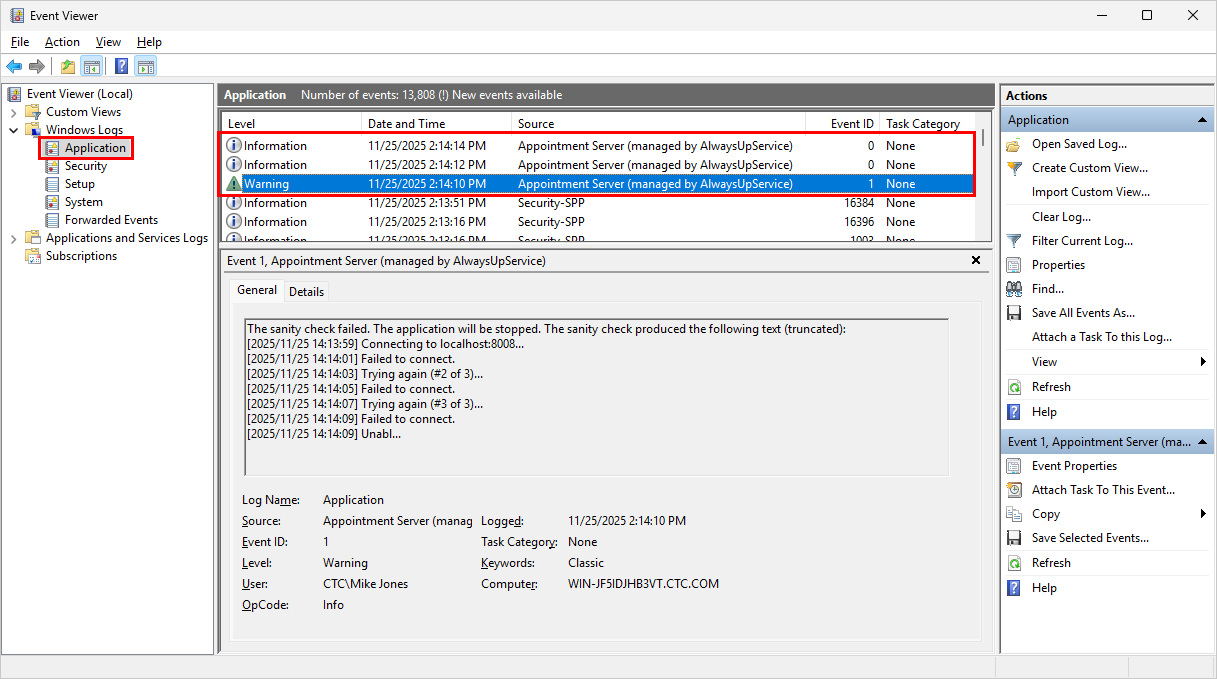
It’s important to realize that because our products support standard Windows logging methods, customers can easily feed those records into a SIEM or other central repository. As such, our logging and reporting is readily compatible with professional, enterprise systems.
Hopefully this article demonstrates our commitment to the principles behind the Cyber Resilience Act. Needless to say, we’ll continue to monitor the emerging regulation and react to any amendments introduced before 2027.
Stay safe!