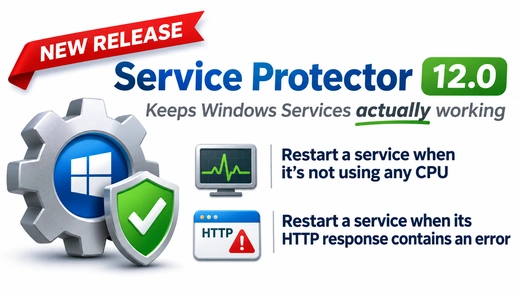
What’s new…
Service Protector version 12 adds powerful tools to help you control zombies — Windows Services that appear to be running but are actually dead on their feet.
Let’s take you through the highlights of this release.

Automatically restart services that are not using the CPU
Does your Windows Service occasionally become hung or deadlocked? And even though it’s running, it’s not using any CPU?
Well, Service Protector now has you covered. The new “CPU Activity” sanity check will probe your service every few minutes and automatically restart it if it’s not using enough CPU cycles.
Setup is super simple. Just provide the minimum CPU your program should use along with a sampling period and you’ll be good to go:
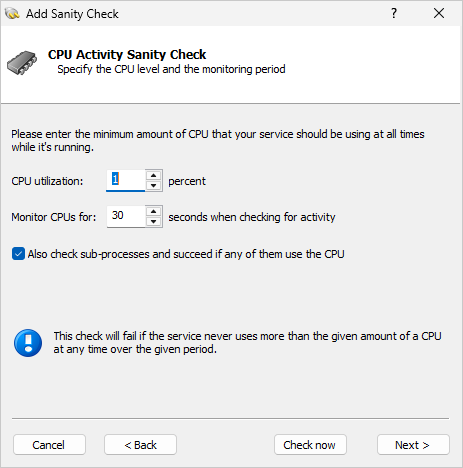
If your service starts many sub-processes, you can include those as well. Service Protector will examine the entire process tree and only take action when every process is idle.
Comprehensive detection of web server failures
Service Protector’s web server health check detects whenever a server isn’t responding properly. Internally, it fetches a URL and declares a failure if there’s no response, or if the response includes a known HTTP error code. Fortunately that approach is good enough to identify the vast majority of website failures.
But one customer demonstrated an unusual scenario. Even though their web server returned a 200 response code, it was broken. And Service Protector couldn’t identify the problem.
Upon closer examination, we discovered that every response included an error message in the HTML. It was there to inform the human accessing the page that there was a problem connecting to the database.
To give Service Protector a fighting chance, we extended the health check to search HTML responses for specific error text. It’s an optional extension, included on the configuration page.
Simply enter the error text and Service Protector will search for it in every 2XX response:
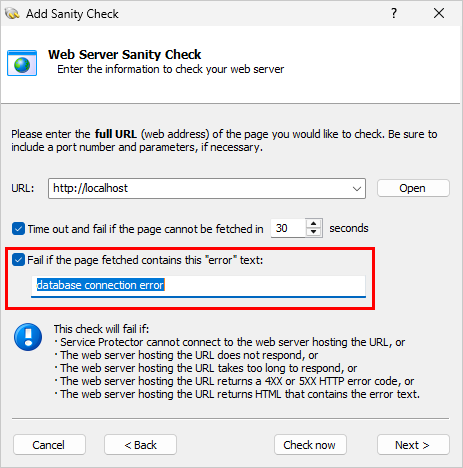
Be sure to use the new capability if you have a web server that returns an HTTP success code but with a fatal error in the HTML content.
Easily see the details of your sanity checks
This next improvement is purely cosmetic. But we like it a lot because it saves us time. 🙂
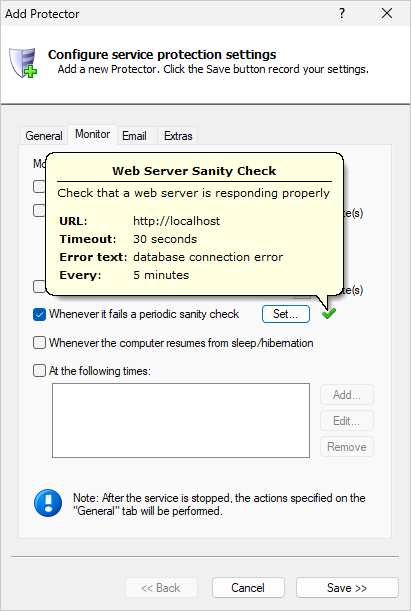
When a sanity check is configured on the Monitor tab, the only way to see the details is to edit it. You have to click the Set button and move through the screens.
To avoid that annoyance, Service Protector 12 shows a friendly tooltip with all the details. It let’s you see what’s going on, with minimal effort.
Hover over the green check mark to summon the new popup window:
Streamlined license management, with online activation
We finally got around to revamping the licensing and activation windows. They’re easier to use, with contextual links that provide helpful guidance:
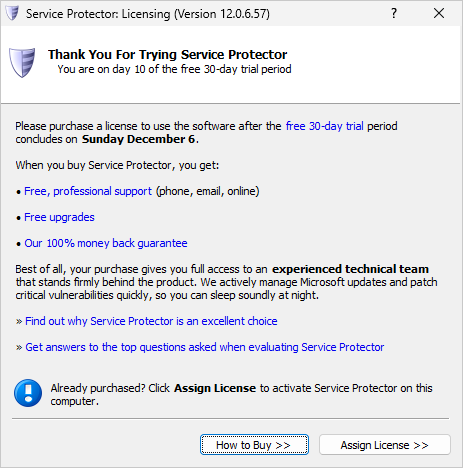
You can:
Purchase licenses online (all major credit cards & PayPal accepted)
Assign a license online (with your Order Reference)
Assign a license offline (if your computer isn’t connect to the internet)
Revoke a license (so that you can use it on another machine)
Service Protector Version 12.0 is 100% clean & safe
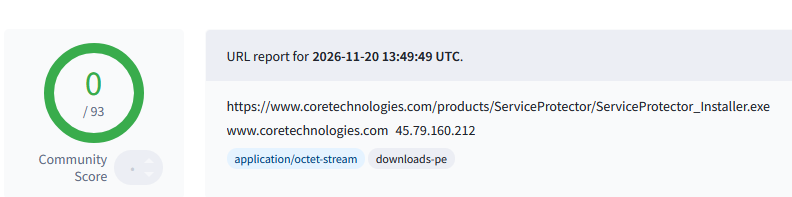
We’re pleased to report that Service Protector 12 is certified 100% clean by VirusTotal, an industry-leading malware detection site owned by Google.
As you can see from the full report, none of VirusTotal’s 93 virus detection engines found any issues at all:
Upgrading to Service Protector 12
If you purchased Service Protector version 11 (after October 25 2025), you can upgrade to version 12 for free.
Simply download and install over your current installation to preserve your existing services and all settings. That way, your registration code will continue to work.
If you bought Service Protector 10 or earlier (before October 25 2025), you will need to upgrade to use version 12.
Please buy upgrades here — at a 30% discount.
See the complete upgrade policy for more details.
Enjoy!