
 I see that you have a new version of your software available or download. Can I upgrade for free? If not, how much does it cost?
— Irene
Hi Irene, thanks for reaching out.
Not all upgrades are free. And the answers to your questions depend on your specific situation. Let’s dig into the details.

Every license includes a free upgrade to the next version
When you buy our software, your license is valid for any release with the same major version number or the next. That is, your purchase includes a free upgrade to the next version.
For example, let’s say you bought AlwaysUp version 16. In that case, you can use:
- Any version 16, and
- Any version 17, because of the free upgrade to the next major version.
However, your license will not work with version 18 and later. You’ll need to purchase a discounted upgrade for that.
How to find the version number purchased
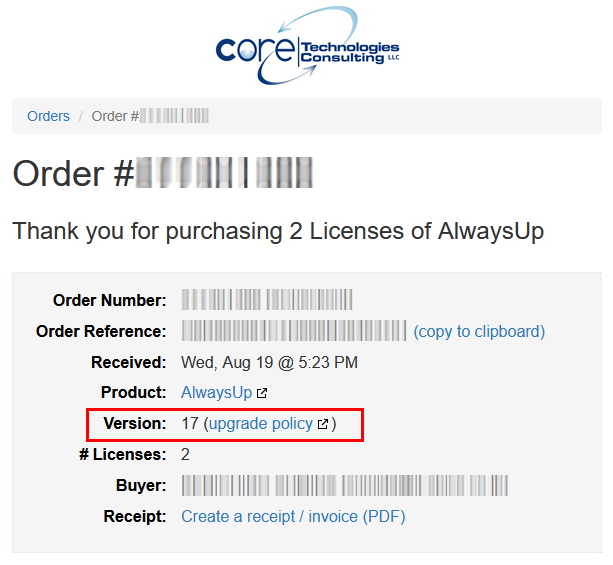
Your order page shows the version number you bought:
How to find the latest version number available
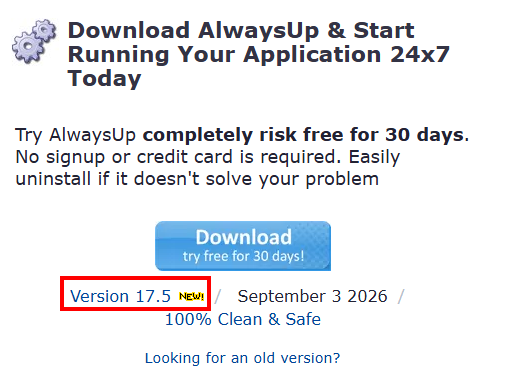
Visit our website to find the latest and greatest.
For example, it’s on the AlwaysUp download page:
And you can find the same on the Service Protector download page.
How to find the version number installed
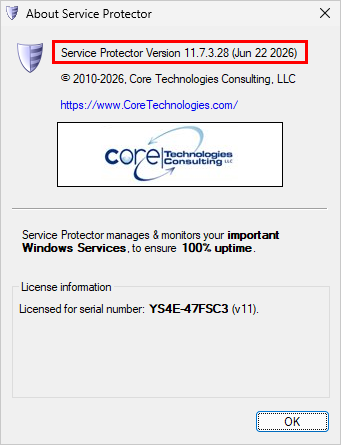
To find the version in use, open the software and choose Help > About from the menu. The window that comes up shows the information.
Here’s what that looks like in Service Protector:
The bottom line
Once you know the version you bought and the version you want to use, you can apply the upgrade policy to figure out if the upgrade is free or not.
Save 30% when you choose to buy an upgrade
If you’re ready to upgrade, be sure to take advantage of generous discount pricing.
An upgrade license for AlwaysUp costs $34.99 and an upgrade for Service Protector costs $69.99. Both are 30% off regular prices.
And just like a full license, an upgrade is good for the next version too. For example, if you pay to upgrade to AlwaysUp version 17 today, your upgrade to the future version 18 will be complimentary.
Frequently asked questions about upgrades
Since you inquired about upgrades, let’s review what other customers have asked our support team. Hopefully this information will help you decide if an upgrade is right for you or not.
What happens if I don’t upgrade? Will the software stop working?
The short answer is that nothing will happen. The software you bought will continue to function normally.
That’s because your license is perpetual. It has no expiration date and you can use it for as long as you like.
To be crystal clear, upgrading isn’t mandatory. That decision is entirely up to you.
Why should I upgrade?
We’re constantly improving our software. Every few months we add time-saving features, fix bugs, apply security patches and react to the unending sequence of updates from Microsoft. Indeed, you can see the steady progress in the release notes (AlwaysUp, Service Protector) and blog articles announcing new releases.
If you rely on our products in a commercial environment — where stability, compatibility, and security are paramount — we strongly recommend keeping your software up to date. It’s the best way to avoid problems and minimize surprises as Windows evolves.
Were do I buy upgrades?
Please purchase at our website:
- AlwaysUp ($34.99/license)
- Service Protector ($69.99/license)
The automated systems will get you set up with the latest version minutes after you complete payment.
Why do you charge for upgrades?
We think it’s the fairest way to operate. Here’s our reasoning.
First, realize that our software is a one-time purchase. There are no ongoing subscription fees and the version you buy is yours to keep.
Second, our team keeps improving the software even after you’ve bought it. Each subsequent release brings new features and adds to the value you receive from the software.
But how should our small company fund that continuous development?
We could:
- include the cost of lifetime upgrades in every license, or
- switch to a subscription model, where customers pay a fee each month, or
- charge only the customers who want to upgrade
We ruled out mandatory lifetime upgrades because that raises the cost for everyone — including those who never intend to update. And a subscription model is a poor fit for our modestly-priced utilities. That leaves charging for upgrades as the only viable solution.
But it’s a excellent one! Charging for upgrades is the most natural way for happy customers to reward us when we deliver added value. Furthermore, the funds from upgrades incentivize us to continue supporting the software and keep making it even better for everyone. It’s a win-win.
When buying an upgrade, will I need to enter any information from my previous orders?
No, you won’t have to enter anything special when making your purchase.
Just pay for the upgrade and our systems will verify eligibility on the back-end.
How often are major releases?
We aim to produce a major software update every 12-18 months. That’s enough time for us to build and deliver significant additional value to customers.
The upshot is that if you buy a license today, you’ll have at least a year (and up to 3 years) of free upgrades included in your purchase.