|
How to Monitor the OpenLink Virtuoso Windows Service with Service Protector |
Automatically restart Virtuoso Server if it crashes, gets shut down accidentally or stops for any reason
Last Updated on November 19, 2026
Virtuoso Open Source Edition
is a multi-model RDBMS platform providing high-performance and scalable data management.
It installs itself as a Windows Service, to start immediately whenever your server boots:
To monitor the Virtuoso Windows Service with Service Protector and ensure that it is automatically restarted if it stops:
-
Download and
install
Service Protector, if necessary.
-
Start Service Protector.
-
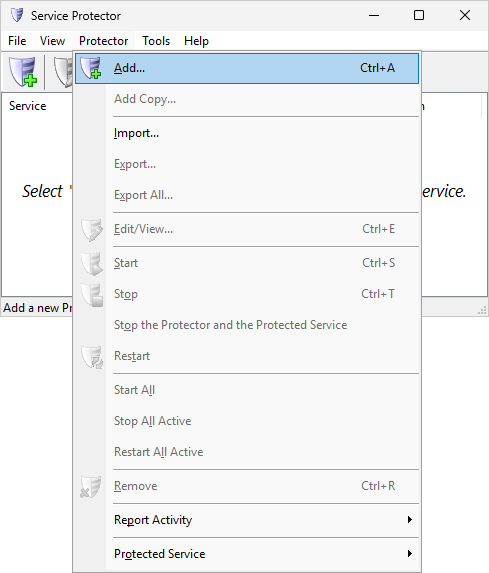
Select Protector > Add to open the Add Protector window:
-
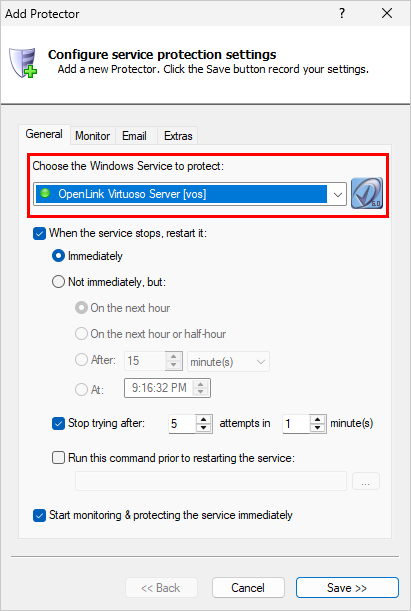
On the General tab, in the Service to protect field, select the Virtuoso Windows Service.
It's called OpenLink Virtuoso Server [vos] on our server:
-
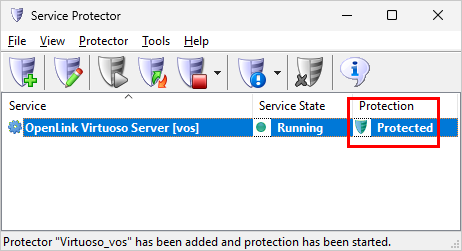
We're done with the basic setup so click the Save button to save your changes. In a few seconds, an entry for the Virtuoso service will show up in the main window.
Service Protector will be busy monitoring Virtuoso:
-
And that's it! Next time your computer boots, Virtuoso will start up automatically and Service Protector will start monitoring
its Windows Service to restart it quickly it if it crashes for any reason.
We encourage you to edit the OpenLink Virtuoso Server entry in Service Protector and check out the many other settings that may be helpful in your environment.
For example, restart the service if it uses too much memory, send an email notification if the service stops, and much more.
Trouble protecting the Virtuoso Windows Service?
From Service Protector, select Protector > Report Activity > Today to bring up an HTML report detailing the interaction between Service Protector and Virtuoso.
Browse the Service Protector FAQ for answers to commonly asked questions and troubleshooting tips. Contact us and we will be happy to help!
|
Peace of mind for your important Windows Services!
|
 |

|
Step-by-step guides for 70+ Services
|